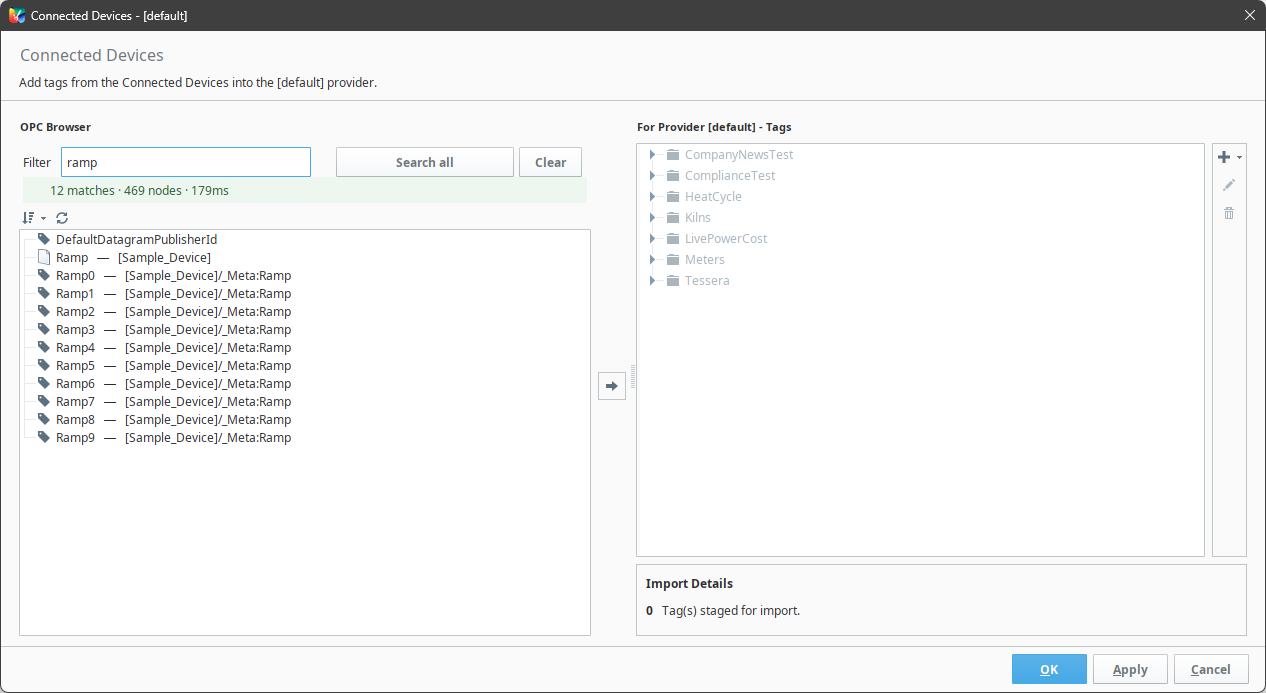
If you have ever gone looking for one tag on a device with a few thousand of them, you know the drill: open a folder, scan it, open the next one. TagFinder puts a search box on Ignition's own browse dialog. Everything else about that dialog works the way it did, including how you import.
What it does
Search [Air-Compressor-1], or Search all.temp finds Zone3_TempSP. zone temp finds it whichever order the words are in. zone*sp for a wildcard, "zone 3" for an exact phrase. Folder names count too, so you can narrow it that way.Installing it
Install the module
Download the .modl, then Gateway → Config → Modules → Install or Upgrade a Module. Accept the certificate prompt if you get one. If you already run one of our modules, you won't.
Restart the gateway
Ignition 8.3 has no hot install, so nothing changes until it comes back.
Reopen the Designer
The Devices button shows up in the Tag Browser toolbar, next to the search icon.
Requirements
Ignition
8.3, including Maker
Scope
Designer
Devices
Any OPC connection
Module
Signed .modl
Price
No license key, no trial, no limits, and nothing phones home. The one thing we ask is that you don't repackage it or sell it on. License.
Questions
Is it really free?
How do I import what I find?
Does it change Ignition’s own Browse Devices?
Which Ignition versions?
Useful? Missing something? Let us know. It tells us what to fix, and what to build next.
Email us about TagFinder